What F29 means on your Amana dryer (amana f29 error)
A amana f29 error on an Amana dryer means a shorted moisture sensor on an older numeric-code dryer — the moisture sensor circuit reads shorted, the opposite of the F28 open problem.
Symptoms
The signs below help confirm you are dealing with this condition rather than a different problem on your Amana dryer. You may notice one of them or several together, and they can appear gradually or suddenly after a power event, a cleaning or self-clean cycle, a spill, or recent installation or service.
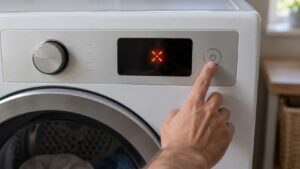
- “F29” shows
- Auto cycles behave abnormally
- Timed dry still works
- The sensor bars may be dirty
Common causes
Several different problems can produce these symptoms. Working through the most likely causes in order separates a quick owner-level check from a problem that needs trained service and the correct Amana parts.
- Shorted moisture sensor — the circuit has shorted
- Filmed or bridged sensor bars — residue shorts the bars
- Damaged wiring — insulation shorts the leads
- Control input problem — the board misreads the sensor
Troubleshooting steps you can try
Work through these checks in order before calling for service. Stop wherever you are unsure, or where mains voltage, gas, a hot oven cavity, water, or a sealed component is involved, and hand the rest to a qualified technician.
- Wipe the moisture sensor bars with a little rubbing alcohol.
- Use timed dry meanwhile.
- Turn the dryer off at the breaker for 30 to 60 seconds, then restore power.
- If “F29” persists after cleaning, leave it for service.
Parts a technician may replace
Depending on what the diagnosis shows, a technician may inspect, test, or replace the moisture sensor bars, harness, connector, and control board. The correct part for your Amana dryer is matched from the model and serial number, and genuine OEM components are fitted through trusted parts suppliers rather than generic substitutes so that performance, safety, and the appliance’s long working life are all protected. Confirming the failed part before ordering avoids replacing more than the problem actually requires.
When to call a technician
F29 that persists after cleaning the bars needs a technician to test the moisture sensor and wiring. When the fix calls for trained service, you can schedule an appointment and an experienced, skilled technician will diagnose and repair it.
As an independent repair service we are not affiliated with the manufacturer, and we work only with experienced, skilled technicians and genuine OEM parts from trusted parts suppliers, with our workmanship backed by a 30-day labor warranty. This condition is rated Low severity, so there is no emergency — but if the same F29 keeps returning after the checks above, a technician should confirm the cause before any part is replaced. When you book, have your Amana dryer model and serial number ready — they are usually on a label inside the door, behind a drawer, or on the side panel — so the right part for your exact build can be matched before the visit and the F29 condition resolved in as few trips as possible.
Related help and Amana resources
Browse other Amana Dryer error-code guides, read about Amana Dryer repair, look up your unit in the Amana models reference, or schedule an appointment. Or see the related F28 open moisture sensor. For full manufacturer specifications and model lookup, visit the manufacturer at amana.com.